Tier-1 Cities · PakistanKarachi · Lahore · Islamabad · Hardware & UPS2026-11-23 · 8 min read

Pragmatic Retail POS Setup & Hardware Sourcing Guide for Karachi, Lahore & Islamabad (2026)

Retailers across Karachi (Saddar, Tariq Road, Bolton Market), Lahore (Shah Alam, Hall Road, Gulberg), and Islamabad/Rawalpindi (Blue Area, Raja Bazaar) can set up a complete zero-downtime POS counter using any standard Windows 10/11 or free Linux PC (4 GB+ RAM), an off-the-shelf 80mm ESC/POS thermal printer (Black Copper or Xprinter from Techno City or Hafeez Centre), a USB barcode scanner, and a basic UPS — powered by Syed POS with a 30-day free trial.

Prefer downloading first? Install the app and click "Get Activation Token via Free Trial" right below the token box — takes seconds, zero card.

Syed POS · Verified Software Proof
Karachi · Lahore · Islamabad Ready
Syed POS Multi-Counter Retail POS deployment for Karachi, Lahore, and Islamabad stores with offline SQLite speed and 80mm thermal printing
Verified UI Proof: High-throughput Pakistani retail counter setup running smoothly on standard desktop/laptop hardware with Black Copper and Xprinter 80mm printers.
PKR 45K–85K
Complete Standard Hardware Package Cost (PC + 80mm Printer + Scanner + UPS)
0.2s on UPS
Full Barcode Checkout & Thermal Printing Speed During Load-Shedding
Win + Linux
Runs on Existing Windows 10/11 or Zero-Cost Linux Ubuntu/Mint PCs (4 GB+ RAM)
01

1. Hardware Sourcing (Hafeez Centre & Techno City) & Load-Shedding UPS Strategy

You never need proprietary locked touch terminals that cost PKR 180,000+. A reliable refurbished Core i3/i5 desktop or laptop paired with a Black Copper BC-85AC or Xprinter 80mm thermal printer, a USB 1D/2D scanner, and a 650VA–1000VA UPS delivers rock-solid 0.2-second offline billing through power cuts.

  • Install on free Linux Ubuntu / Mint (.AppImage or .deb) or Windows 10/11 to get maximum speed even on older counter PCs.
  • Sync 2 to 15 counters across your shop and monitor live profit from home on your mobile phone.
Pragmatic Pakistan Counter Hardware Checklist & Budget Reference
1. Counter PC:   Core i3/i5 SSD PC (4 GB+ RAM) on Windows 10/11 or Free Linux Ubuntu/Mint
2. Printer:      80mm ESC/POS (Black Copper BC-85AC / Xprinter XP-N160I / Epson TM-T82)
3. Scanner/UPS:  USB 1D/2D Plug-and-Play Barcode Scanner + Heavy-Duty RJ11 Drawer + 650VA-1000VA UPS

Sourced locally from Hafeez Centre (Lahore), Techno City (Karachi), or 6th Road / Blue Area (Rawalpindi & Islamabad) with zero vendor lock-in.

Syed POS · UI Evidence #1Core i3/i5 + UPS + 0.2s POS
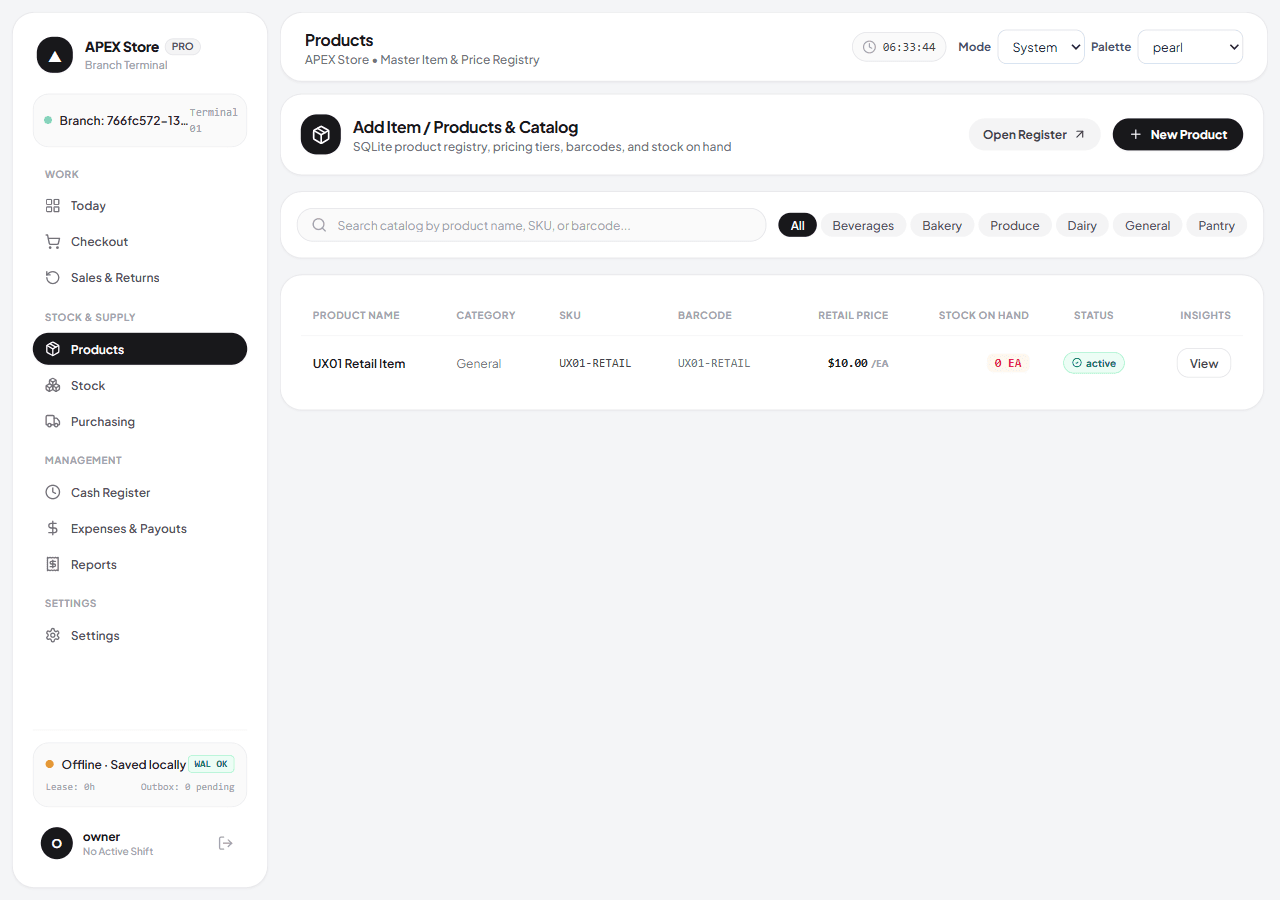
Syed POS Pakistani Retail Counter UI running fast offline billing on standard Core i3/i5 desktop hardware
Zero-Bloat Desktop Speed: Built for standard Core i3/i5 shop PCs and laptops so even high-SKU marts in Karachi, Lahore, and Islamabad run smoothly on UPS power.
02

2. Local Market Printer & Linux Setup: Black Copper, Xprinter USB & LAN TCP/9100

Most hardware dealers in Hafeez Centre (Lahore), Hall Road, Techno City (Karachi), and Rawalpindi stock Black Copper, Xprinter, and Epson 80mm/58mm ESC/POS thermal printers. Syed POS prints directly to Windows USB queues, Linux CUPS (/dev/usb/lp0), and Ethernet LAN printers (TCP port 9100) while firing the RJ11 cash-drawer pulse automatically on cash bills.

  • Switch between Native Urdu (Nastaliq RTL), English (LTR), and Arabic (RTL) per terminal with 1 click so every counter salesman works comfortably.
  • Deploy on Ubuntu / Linux Mint (.AppImage or .deb) to cut OS license fees and eliminate USB pen-drive virus downtime across multi-counter stores.
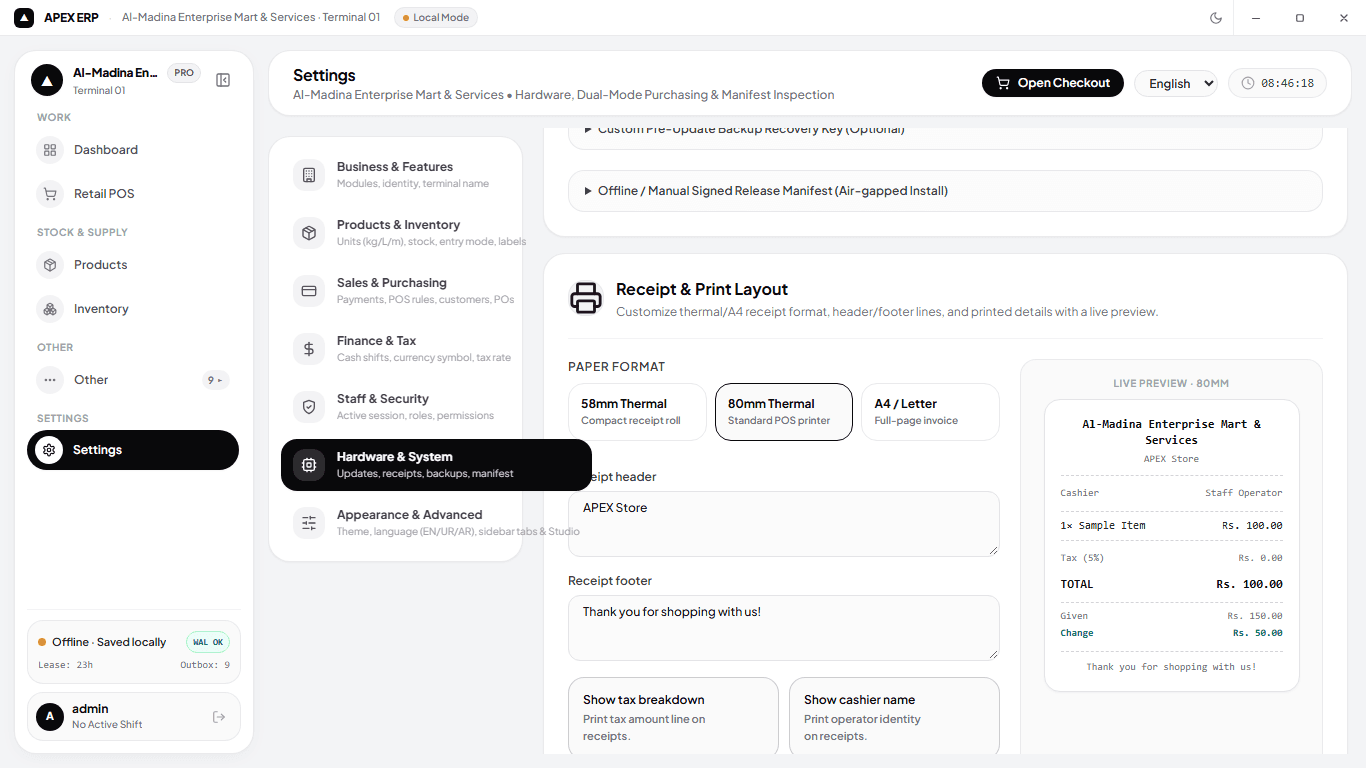
Syed POS · UI Evidence #2Black Copper & Xprinter 80mm
Syed POS Thermal Printer Configuration screen showing 80mm/58mm paper setup, receipt preview, and USB/LAN port compatibility
Plug & Print Thermal Setup: Configure 80mm/58mm Black Copper, Xprinter, or Epson thermal printers with live preview — works identically over Windows USB, Linux CUPS, and LAN TCP/9100.
03

3. Raast / JazzCash / EasyPaisa Tracking, Wholesale Khata & Multi-Counter Owner Control

Whether you run a retail supermarket in Gulberg or Blue Area, a garments boutique on Tariq Road, or a wholesale supply depot in Shah Alam or Bolton Market, cashiers must record JazzCash, EasyPaisa, and Raast bank transfers alongside B2B customer Khata and Qist installments without missing a rupee.

  • 30-day free trial with Download-First onboarding (get your activation token right from the app login screen) and direct PKR billing via Meezan IBAN, Raast, JazzCash, or EasyPaisa.
  • Monitor daily branch profit, overdue Khata installments, and cashier drawer counts directly on the owner’s smartphone.
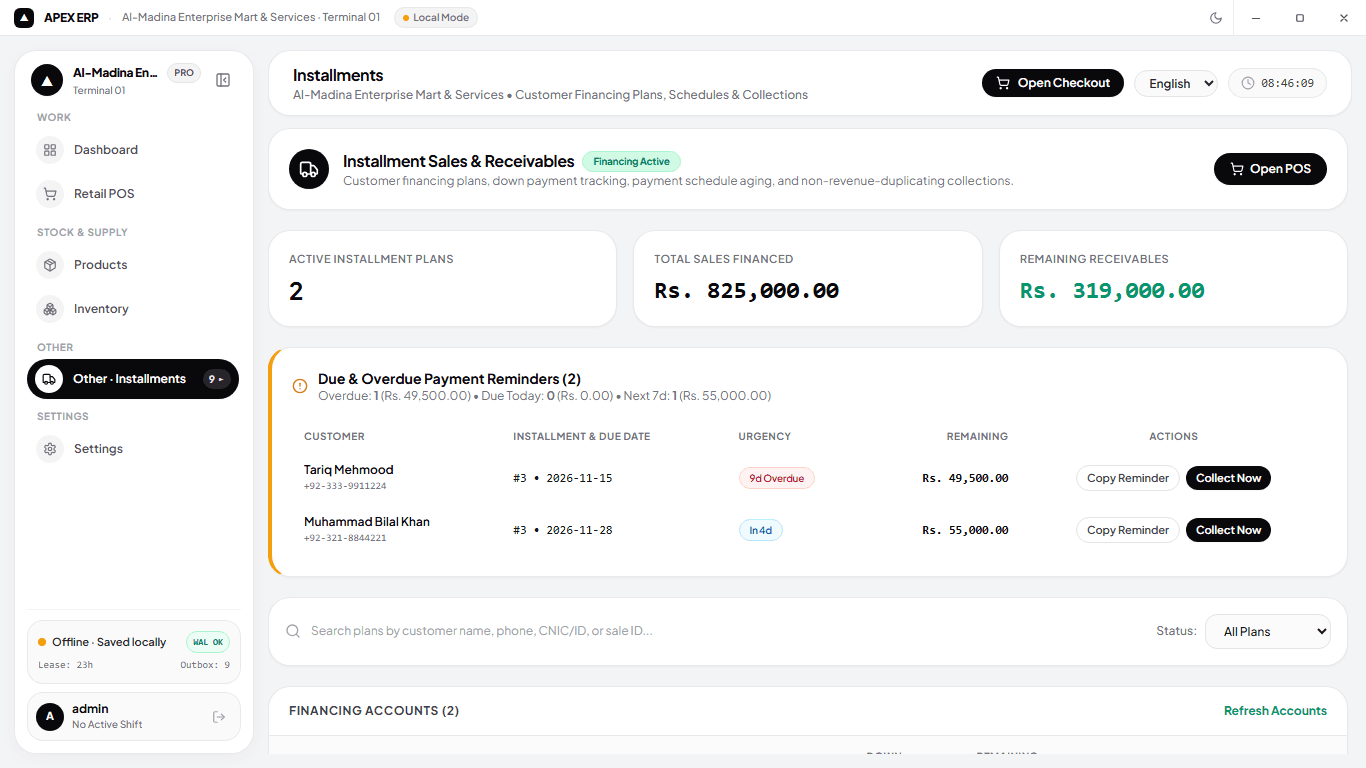
Syed POS · UI Evidence #3PKR Khata + Qist Recovery
Syed POS Khata & Installment Tracking screen showing Pakistani customer names, PKR receivables, and 1-click Collect Now recovery
Bolton Market & Shah Alam Market Khata + Installment Ready: Track rupee credit limits, guarantor CNIC contracts, and overdue collection reminders cleanly.
Complete Syed POS Ecosystem Overview

How This Feature Connects to the Full Syed POS Platform

Every feature in Syed POS runs inside one universal offline-first desktop installer (Windows & Linux) backed by an authoritative SQLite WAL database, double-entry general ledger, and 10-second Cloud Owner Portal sync.

Direct Answers to Common Merchant Questions

Do I need an expensive server room to run 3 counters in my supermarket or pharmacy?

No. Install the same universal Syed POS desktop app on all 3 counter PCs — catalog updates, stock changes, and branch P&L sync automatically through your Business Pro subscription.

Will my existing Black Copper or Xprinter thermal printer from Hafeez Centre / Techno City work?

Yes, 100%. Any standard 80mm or 58mm ESC/POS thermal printer connects directly via Windows USB, Linux CUPS (/dev/usb/lp0), or LAN TCP/9100.

What is the typical hardware setup cost for a complete retail POS counter in Karachi or Lahore?

A typical complete counter bundle (Refurbished Core i3/i5 PC, 80mm Black Copper/Xprinter thermal printer, USB 1D/2D scanner, RJ11 cash drawer, and a basic UPS) costs roughly PKR 45,000–85,000 one-time — or just PKR 18,000–25,000 if you already have a shop laptop or desktop.

How can I try the software before paying for a subscription?

Yes. Download the universal Windows or Linux installer directly from our Download page, open the app, and click the Free Trial button below the Activation Token field to get a 30-day full trial token in seconds with zero credit card required.