One universal offline-first POS & ERP engine covers all 10 business verticals — Supermarket, Pharmacy, Restaurant, Mobile Shop, Wholesale, Clothing, Bakery, Hardware, Auto Workshop, and Salon — on Windows and zero-license-cost Linux counter PCs.
Windows 10/11 (64-bit) & Linux Ubuntu/Debian/Mint (64-bit) · Offline SQLite WAL Engine · All 10 Editions Built-In
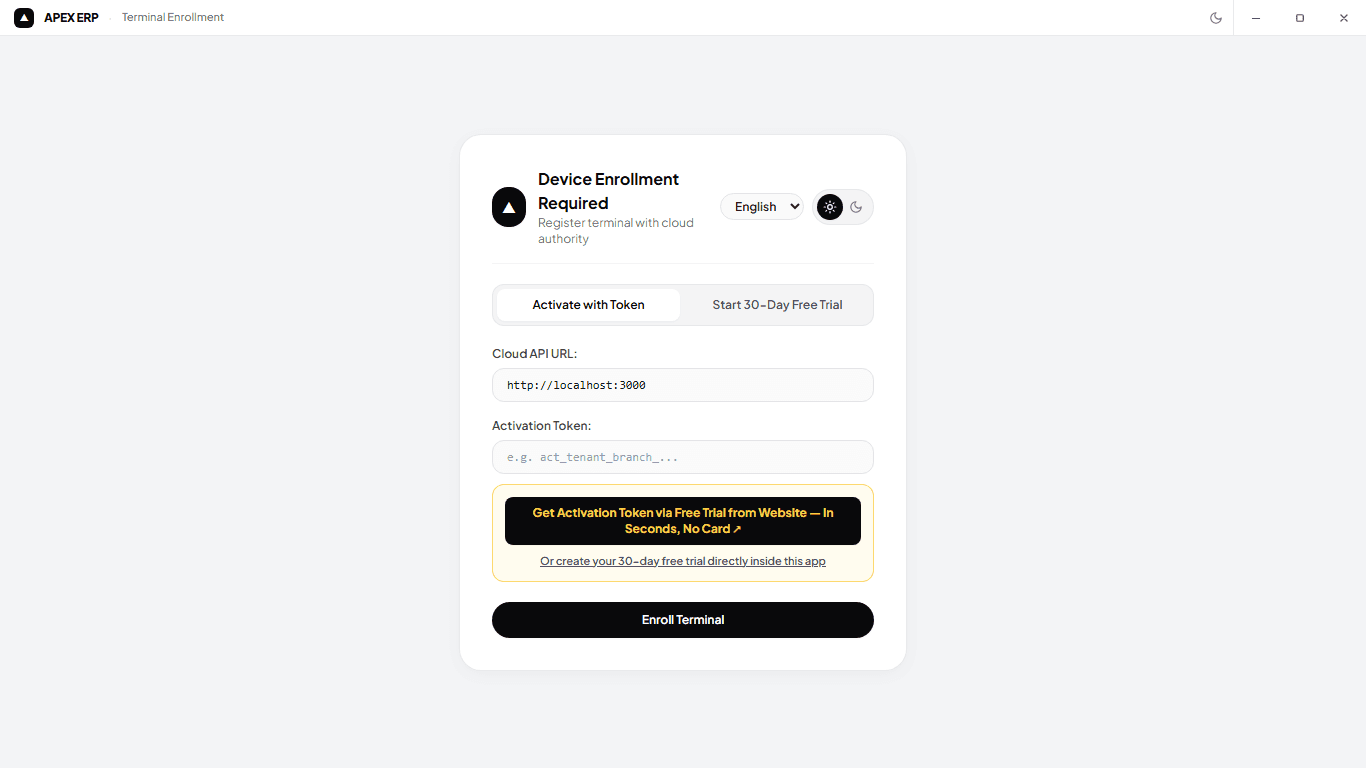
Prefer downloading first? Install the app and click the button directly below the Activation Token field to get your 30-day free trial token from our website in seconds — no card required.Create Free 30-Day Trial First →
Choose Your Counter Operating System
Available Now
Windows 10 & 11 (64-bit)
Recommended for standard retail counters. Includes native Win32 USB raw printer spooler, LAN TCP/9100 printing, and Ed25519 signed auto-updates.
From Download to First Thermal Receipt in 60 Seconds
1. Create your 30-day free trial
Register your shop name, choose your industry vertical, and copy your activation token (act_...) — zero credit card needed.
2. Install on Windows or Linux
Run syed-pos-universal-setup.exe on Windows or syed-pos-universal-linux-x86_64.AppImage / .deb on Linux in 20 seconds — no external SQL server or XAMPP required.
3. Paste activation token & start billing offline
Your vertical modules unlock immediately, thermal printing works in 0.2s, and multi-counter sync begins automatically.
Verified Desktop UI: 1-Click Free Trial Button Right Below the Activation Token Field
Seconds · Zero Card
Open the installed Windows or Linux app and click "Get Activation Token via Free Trial from Website" directly below the token field to activate your 30-day full trial in seconds with zero credit card.
Minimum Hardware & System Requirements
Operating System
Windows 10 (1903+) / Windows 11 (64-bit) OR Linux Ubuntu 22.04/24.04, Debian 12+, Linux Mint (64-bit) · macOS Coming Soon
Processor & RAM
Dual-Core Intel/AMD CPU · 4 GB RAM (8 GB recommended)
Local Storage
500 MB free SSD/HDD space for local SQLite WAL ledger
Printers & Scanners
Any 80mm / 58mm ESC/POS Thermal Printer (Windows USB, Linux CUPS / /dev/usb/lp0, or LAN TCP/9100) & USB/BT Barcode Scanner
Internet Requirement
Optional during billing — required only for cloud sync & activation
Every update bundle is cryptographically verified via Ed25519 signatures before installation, and the updater strictly preserves your local customer SQLite database across every upgrade and uninstall.